
OrderStock Pro by TulipWork
Count your stock in 5 minutes a day. Your supplier orders are ready.
Your team counts stock from a phone. OrderStock works out what to order and sends each supplier a clean order form, by email or WhatsApp.
€79 per month per location (excl. VAT) · First month free · Cancel anytime

✓ Stock counted · 5 min
✓ Order sent to supplier
Used every day in 4 restaurants
No app to install
Setup done with the founder
Cancel anytime
The problem
You think a stock count takes hours. It takes minutes.
Most food businesses rarely count their stock. It feels like a three-hour job, so it happens once a month, or never. Orders are decided by memory, and money ends up in the bin without anyone seeing it.
Orders by gut feeling
Teams order from memory and habit. Cautious managers over-order, optimists run out. Both cost money.
Waste nobody sees
What goes in the bin is rarely written down. The margin leaks in silence.
Counting is slow, so it barely happens
An hour a week on paper, when someone has time. Decisions run on old numbers.
Example: a location doing €30,000 a month buys about €9,000 of goods. If 5% ends up in the bin, that is about €450 lost every month, more than five times the monthly price of the tool.
How it works
Three steps, every day, in a few minutes.
This is not accounting and not recipe costing. It is a quick daily count that tells you exactly what to order.
1
Count stock on a phone
Your team updates stock from any smartphone. No app to install, no paper lists.
2
Orders build themselves
Safety stock, target stock or sales trends fill in the quantities. You check and adjust.
3
Send in one click
Each supplier gets a professional order form by email or WhatsApp, in their language.

Order suggestions
OrderStock tells you how much to order.
After the count, the quantities for each supplier are already filled in. They follow your stock levels or your daily sales, and respect pack sizes.
- Forecast mode, based on your daily sales
- Threshold mode, when an item runs low
- Change any quantity before sending
- Every order saved in your order history
See it in a real restaurant
Filmed during a normal day at Libshop.
A 4-minute walkthrough: the stock count, the order suggestions and the order sent to the supplier. Real team, real data.

Features
Everything a busy kitchen needs. Nothing it doesn’t.
Inventory on any phone
Update quantities in real time, from the kitchen or the stockroom.
Smart order suggestions
Choose forecast mode (based on daily sales) or threshold mode (order when an item runs low).
One-click supplier orders
A professional PDF order form, sent by email or WhatsApp.
Waste tracking
Staff log waste in seconds, with a reason. See the money lost by product, by reason and by store.
Multi-store and central kitchen
All your locations in one dashboard. Combine orders into one prep list for your kitchen or warehouse.
Reports and valued inventory
Purchases by supplier, store or category. Export a valued stock count as PDF or CSV.
Also included: CSV import and export, bulk edit, team permissions, order reception.
Proof
Born in our own restaurants. Used there every day.
Libshop is a group of 4 Lebanese restaurants in Paris with its own production kitchen. OrderStock was built there, to solve our own ordering, waste and stock problems. Our teams count, order and track waste with it every day.
4
restaurants and 1 production kitchen, every day
5 min
a day to count stock and place orders (before: about an hour a week, when someone had time)
−30%
less waste

“I did not build a product to sell it. I built the tool I needed, then shared it.”
Who it’s for
Made for any business that orders stock every week.
- Restaurants
- Cafés and coffee shops
- Bakeries
- Delis and food shops
- Groups with a central kitchen
- Shops and retailers
A closer look
See the screens your team will use.
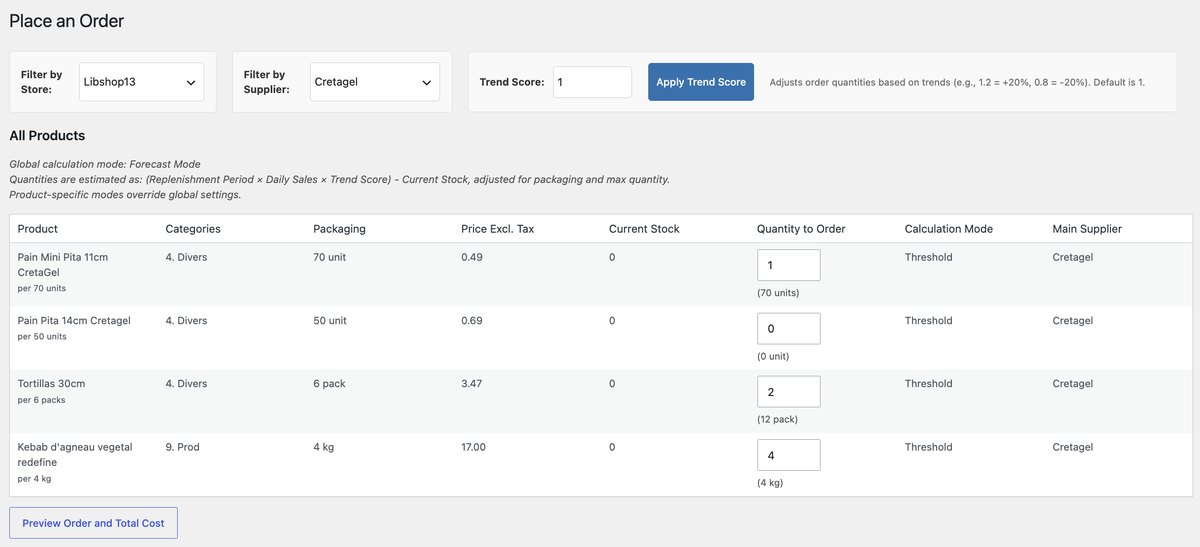
Place an order
Quantities are pre-filled for each supplier. Check, adjust, send.

Receive deliveries
Compare what you ordered with what arrived, and log the real prices.

Track waste
Each loss is logged with a reason: expired, damaged, preparation, overproduction.
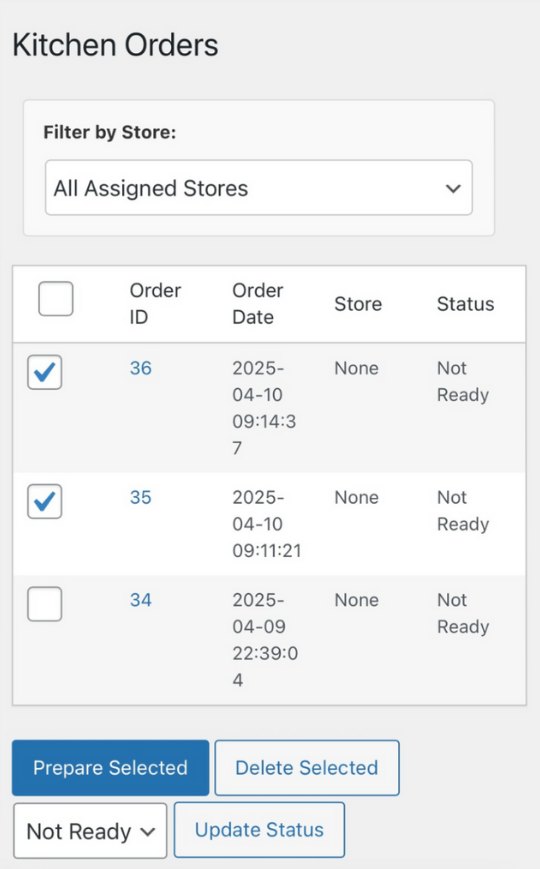
Central kitchen
Combine the orders from your locations into one prep list.
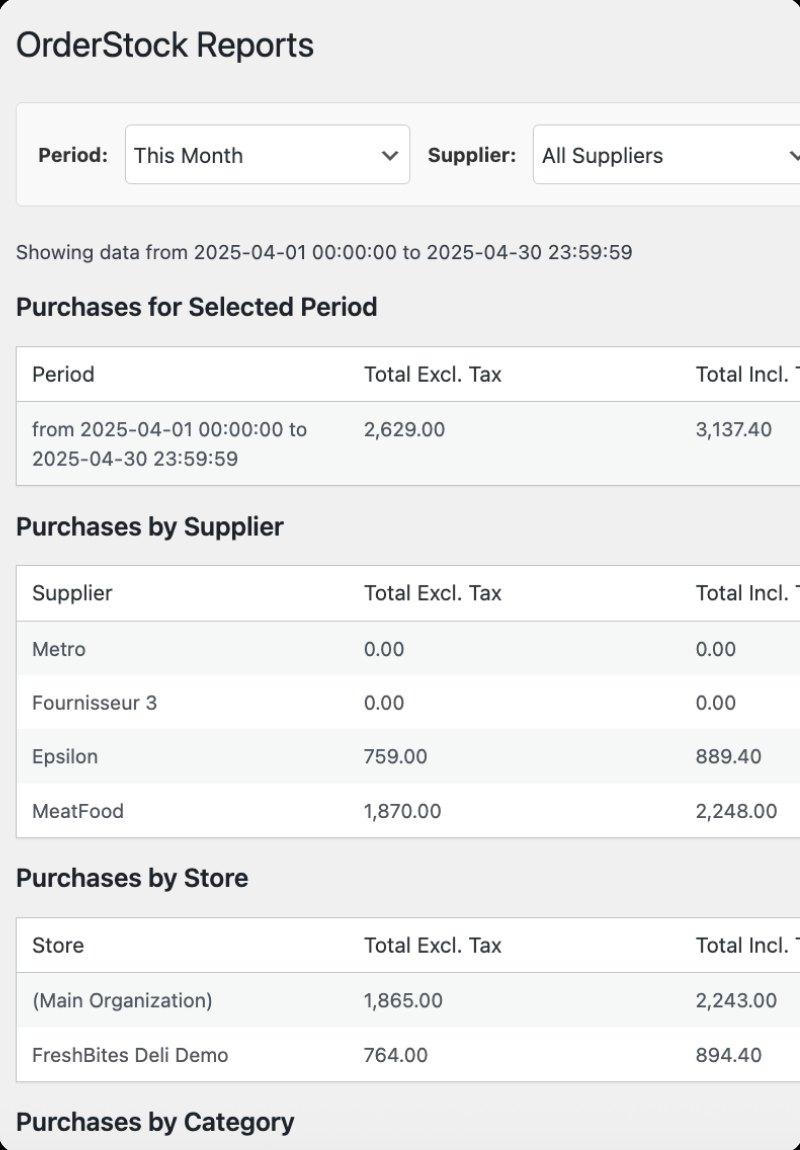
Purchase reports
See what you buy, by supplier, store and category.
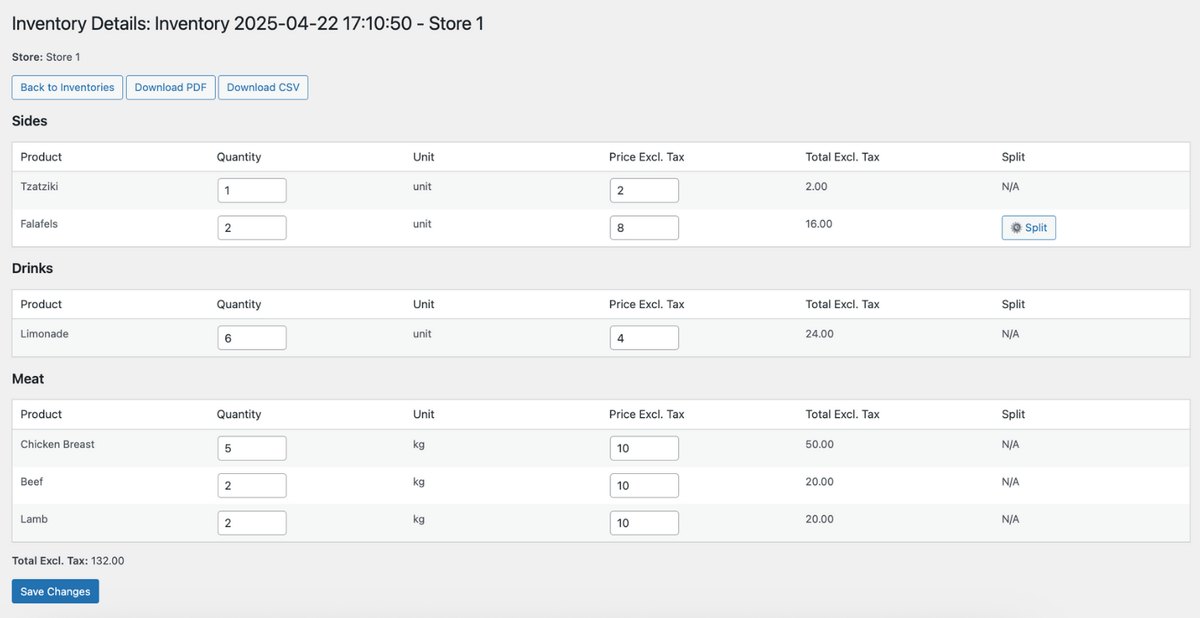
Valued inventory
Export a valued stock count as PDF or CSV.
Click any screenshot to enlarge it. Want every detail? Read the documentation →
Pricing
One simple price. Everything included.
First month free
OrderStock Pro
€79 / month / location
excl. VAT · no commitment
- All features included, nothing locked
- Unlimited users and suppliers
- Central kitchen module included
- Send us your product list, we import it
- Onboarding and support by the founder
- Group offer above 10 locations
Nothing charged today · Cancel anytime
More than one location? Choose your number of locations on the Plans page.
FAQ
Questions? Answers.
Is this accounting software?
No. OrderStock does not replace your accountant or your recipe costing. It tells you what you have and what to order, every day.
How long does a count really take?
At Libshop, about 5 minutes a day per location. The team counts by supplier or category, on a phone, right before ordering.
Do I need to install an app?
No. OrderStock works in the browser, on any phone, tablet or computer.
Can I import my product list?
Yes, by CSV. Or send us a simple list (product name and unit) and we import it for you.
I only have one location. Is it worth it?
Yes. Most of the time saved and waste avoided happens in each location, whatever the size of the group.
Can my suppliers receive orders by WhatsApp?
Yes. Each order can be sent by email or WhatsApp, with a PDF order form.
Does it connect to my POS or my accounting?
Not out of the box today. It runs on its own from day one. A connection can be built on request when your system has an API.
What happens after the free month?
Your plan continues at €79 per location per month (excl. VAT). You can cancel at any time from your account.
Know exactly what to order tomorrow morning.
Start with one location. We set it up with you this week.
€79 per month per location (excl. VAT) · First month free · Cancel anytime